
cctv for restaurant
CCTV for Restaurants: Best Cameras & Placement 2026
A restaurant needs different camera specs for each zone rather than one generic CCTV system planner: the till and bar, the kitchen, the entrance and foyer, and…
On this page
- What CCTV does a restaurant actually need?
- The four zones that matter
- Don't centre every table
- Which camera is right for the till and bar area?
- What camera specs survive a commercial kitchen?
- Why kitchens get their own category
- A practical mounting tip
- How many cameras and how much storage does a restaurant need?
- Matching the recorder to the zone count
- The storage formula
- Is it legal to film staff and customers, and can footage be requested?
- What are the rules for CCTV in a business, and does covert staff monitoring cross a line?
- Requesting footage from a pub, supermarket, nightclub or cafe: does the venue type change anything?
- Can CCTV footage be edited without weakening it as evidence?
- Related products
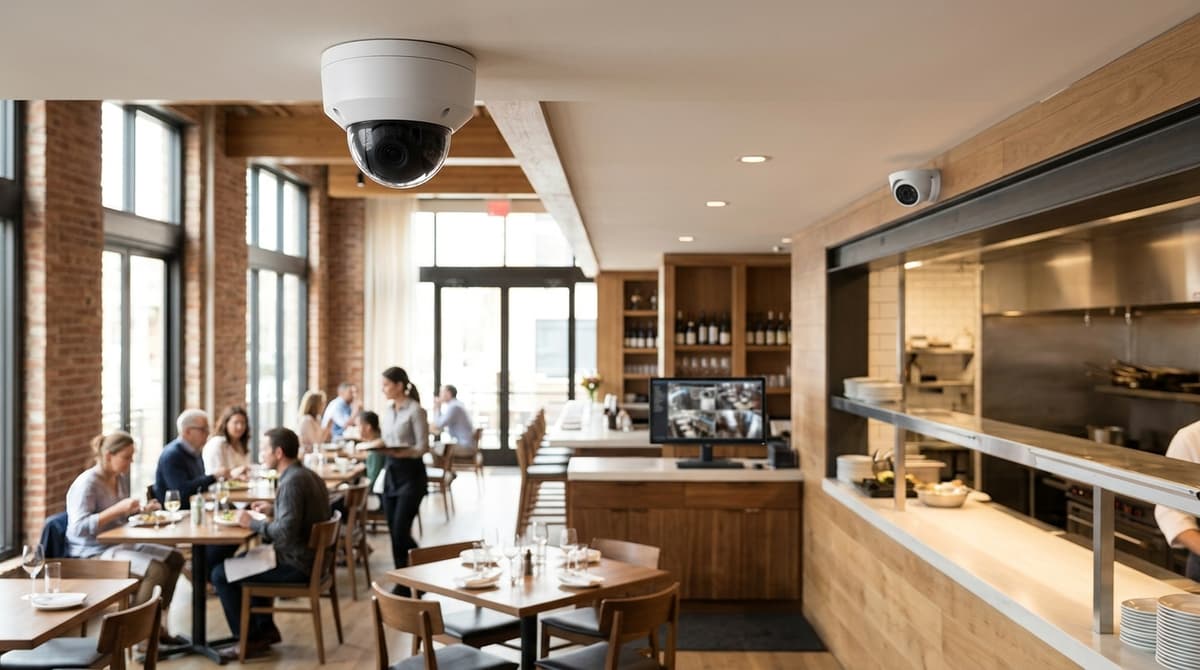
A restaurant needs different camera specs for each zone rather than one generic CCTV system planner: the till and bar, the kitchen, the entrance and foyer, and the stockroom or back door all place different demands on resolution, housing and placement, a split that lines up with how coverage is typically framed in the wider industry. For a zone-by-zone breakdown of picking and positioning warehouse-style cameras, see our warehouse CCTV camera selection and placement guide.
The one caveat worth flagging before anything else: dining-room cameras should cover access and payment points, not sit centred on tables, where staff and diners have a reasonable expectation of privacy. This guide assumes you're buying kit to fit yourself or hand to your own electrician or installer, not booking a full installer visit — so below we work through what each zone needs, with a purchasable example where one fits and clear selection criteria where it doesn't. Before you go further, it's worth reading up on what ANPR cameras do in the UK so you know how they differ from standard CCTV.
What CCTV does a restaurant actually need?
A restaurant needs different camera specs for each zone — till, kitchen, entrance, dining room and stockroom — matched to each area's actual risk rather than a single spec repeated throughout the building.
That's the gap in most general business CCTV advice: a café or restaurant has distinct risks at each point, so a single spec sheet applied everywhere under-serves some areas and over-serves others.
The four zones that matter
Competitor guidance converges on a similar coverage map. cctv.co.uk frames restaurant security around monitoring the till, deterring walk-outs, and covering stock areas, while another industry guide sets out coverage zones as entry and counter visibility, cash-handling points, rear access, and after-hours review.
- Till or bar — needs a clear, close view of the cash-handling point for dispute resolution, not just a wide shot of the room.
- Kitchen — covers stock movement, food-safety incidents and staff conduct near prep areas. Steam, grease and heat are a factor here: check a camera's ingress rating before mounting it near a pass or fryer, since that rating covers resistance to solids and water ingress rather than steam or heat tolerance specifically.
- Entrance or foyer — records who comes and goes, useful for walk-out disputes and after-hours entry.
- Stockroom or back door — often the highest-risk point for out-of-hours access and deliveries, given it sees less footfall and fewer eyes than the front of house.
Don't centre every table
The dining room itself needs a lighter touch than the other zones. Staff safety and cash-point visibility matter more than watching every table, and that's a caveat worth taking seriously, since customers eating a meal are in a different privacy position to staff at a till or a delivery driver at a back door.
Any system still needs a documented purpose and visible signage under the UK GDPR and the ICO's CCTV guidance, and pointing a camera at where people sit to eat rather than at operational pinch-points is harder to justify if it's ever challenged. For office-side setups with similar planning questions, see our CCTV camera for office guide.
Retention is worth planning alongside coverage rather than as an afterthought: many licensed premises keep footage for around 28-31 days to align with typical licensing conditions, but UK GDPR still expects you to hold it no longer than the documented purpose requires, so the right figure depends on your own licence and risk assessment rather than a fixed industry number.
The takeaway: match the camera to the zone's actual risk, not a single spec repeated round the building.
One practical note before choosing hardware: this guide sets out zone requirements and gives selected product examples rather than a purchasable camera for every zone. It assumes you're buying equipment to have fitted by your own electrician or installer, not booking an installer visit — Clear Security sells the cameras, NVRs and cable, and a qualified installer or your electrician handles the fit, wiring and setup against the product's datasheet.
Which camera is right for the till and bar area?
The till and bar area needs a fixed camera with enough resolution to read transaction details and identify faces reliably, mounted so the till drawer and screen sit clearly in frame. This is the one zone in a restaurant where sharp detail matters more than wide coverage, because footage here is what gets reviewed after a cash discrepancy or a card dispute.
A practical fit is the Hilook 4 MP Fixed Turret Camera, which delivers 2560 × 1440 resolution and is rated for indoor and outdoor use. Positioned above and slightly forward of the till, that resolution gives you a good chance of reading the till screen and a customer's face in the same shot, but how well it actually works depends on the camera's field of view, its distance from the till, the lighting at that point and exactly where it's mounted — it's worth checking placement against the till layout before assuming both will be legible together.
The fixed lens keeps the field of view constant, which matters for a till point where the camera should never drift off target.
The till camera earns its keep when it's paired with the point-of-sale system. Some commercial restaurant security setups overlay transaction data onto the video feed, so a refund or a void can be checked against the recorded footage frame-by-frame. That's a system-level integration between camera and till software, not something any single camera does out of the box, and it's worth checking with whoever supplies your EPOS software before assuming footage and transaction logs will line up automatically.
Covert till cameras — hidden rather than clearly visible — are sometimes raised as an option, but they carry real legal and HR weight. Covert monitoring of staff sits outside the normal transparency expected under workplace surveillance guidance, and it's a decision for an installer or HR adviser to make deliberately, not a product choice.
This site sells overt, clearly-mountable cameras; if covert monitoring is being considered, that's a conversation for a qualified installer, not a specification on a spec sheet.
What camera specs survive a commercial kitchen?
Kitchen zones need an IP-rated, heat- and grease-tolerant enclosure — this is the practical differentiator that a lot of general CCTV advice skips, and it's the one spec category most guides to cctv for restaurant gloss over when they treat the whole site as one uniform install.
An IP rating describes how a camera housing performs against standardised tests for solid ingress and water ingress — it's expressed as two digits, the first for solids and the second for liquids. It says nothing about image quality, and it doesn't certify tolerance to grease, heat or steam specifically, so the correct rating for a kitchen environment is whatever the manufacturer's own datasheet states for that model, not something you should assume from a product name.
A dome or turret camera rated for a dry office corridor isn't automatically suitable for a kitchen pass or extraction hood area. Steam and airborne grease can settle on a lens and housing seal in ways office dust doesn't, which is one reason to treat kitchen cameras as their own spec category rather than an extension of the dining room setup.
Why kitchens get their own category
The logic isn't just about hardware survival — kitchen footage can double as evidence for food-safety and hygiene review. Some vendors position cameras for food-hygiene monitoring, pointing to video review supporting checks on handling, storage and prep discipline; treat this as a capability worth asking about when you're comparing cameras, rather than a specific feature confirmed on any camera this site stocks.
A practical mounting tip
Position the camera away from direct extraction airflow and fryer spray zones, angled to capture the pass and prep bench rather than staring straight into steam plumes — this can reduce condensation on the lens and extend the time between cleans. For the enclosure spec itself, always check the individual product's datasheet or installation guide rather than assuming a rating; if you're unsure which unit suits a specific kitchen layout, browse the range at Clear Security or ask for a suggested system.
How many cameras and how much storage does a restaurant need?
Camera count should match your zones, not a round number. Storage is calculated separately: retention days multiplied by camera count and resolution, not a fixed capacity.
Till, kitchen, main entrance, dining floor and stock room or back door each typically warrant their own view, so a single-site restaurant might land at five to eight cameras once you add a rear fire-exit or delivery point — treat that as an illustrative layout, not a fixed norm, since a smaller or larger footprint will shift it. Storage is a separate calculation entirely: it follows retention days multiplied by camera count (and resolution/bitrate), never a fixed capacity you buy once and forget.
The channel count comes from the zones you need covered, and the storage comes from how long you must keep that footage — treat them as two separate sums, not one spec.
Matching the recorder to the zone count
For a multi-zone IP setup — till, kitchen pass, entrance, dining and a stock or back-door camera, plus room to add a car park or delivery-bay camera later — the Prolux PXN-5216-16P-4KS2E 16-channel NVR gives useful channel headroom. It has 16 built-in PoE ports, supports network cameras up to 8MP, and takes incoming bandwidth of up to 160 Mbps, so a restaurant running five to eight cameras today has spare channels for expansion — though you should still check the recorder's total PoE power budget against your actual camera load before adding more, since available wattage rather than port count is what limits expansion.
Smaller venues — a café, a takeaway counter, or a single-room restaurant keeping one existing analogue camera in place — don't need that much headroom. The XVR-3108AD-4MP 8-channel hybrid DVR supports a mix of TVI, AHD, CVI, CVBS and IP inputs on the same recorder, which suits a site upgrading gradually rather than replacing every camera at once.
| Site type | Typical zones | Recorder |
|---|---|---|
| Multi-zone restaurant, 5–8+ cameras | Till, kitchen, entrance, dining, stock/back door, plus spare | Prolux PXN-5216-16P-4KS2E, 16 PoE ports |
| Café or small restaurant, mixed cameras | Till/counter, entrance, 1–2 more | XVR-3108AD-4MP, 8-channel hybrid |
The storage formula
Storage requirement is: retention days × camera count × per-camera daily footage size (which depends on resolution, frame rate, compression and how much motion the scene has). Rather than quoting a fixed terabyte figure, size the drive against the retention period you actually need — a busy kitchen camera on constant recording will consume far more than a quiet stock-room camera on motion-triggered recording, even over the same number of days.
Check current retention practice and any request-and-preserve deadline your local force publishes before fixing the number of days, since that's the variable driving the whole calculation. For a tailored channel count and drive sizing against your own floor plan, browse the range at Clear Security or ask for a suggested system.
Is it legal to film staff and customers, and can footage be requested?
Yes, UK employers can lawfully film staff and customers within ICO guidance and UK GDPR, provided there's clear signage and a defined purpose for recording. Individuals can request footage of themselves via a subject access request, and the business holding it can redact other identifiable people before releasing a copy.
UK employers can lawfully film staff and customers, but only within the ICO's CCTV guidance and UK GDPR, which call for clear signage, a defined purpose for recording and no cameras in areas like toilets or staff changing rooms. Filming without justification or hiding cameras from staff is where restaurants run into legal trouble, not the act of monitoring itself.
What are the rules for CCTV in a business, and does covert staff monitoring cross a line?
Staff need to know monitoring takes place, signage should sit at entry points, and the level of surveillance has to match a stated purpose such as till security or health and safety rather than blanket coverage of every corner. Covert filming without a documented reason and review process — for example, secretly recording a till because you suspect one member of staff, without any record of why — sits outside the ICO's guidance and is where an employer risks a complaint or claim.
Requesting footage from a pub, supermarket, nightclub or cafe: does the venue type change anything?
No — under UK GDPR, any individual can submit a subject access request for footage of themselves regardless of whether the venue is a pub, supermarket, nightclub, cafe or restaurant. The business holding the footage has to respond, though it can blur or redact other identifiable people caught in the same clip first. There's no separate rule for hospitality venues; the same request process applies everywhere CCTV is recorded.
Can CCTV footage be edited without weakening it as evidence?
Raw footage pulled from an NVR or DVR should be preserved as an original, unedited record wherever it may be needed for evidence or a subject access request. Once exported, most recording software lets you trim a clip or cut a shorter segment for sharing with police or insurers, but altering the underlying recording can weaken its evidential value. Keep an unedited copy alongside anything you cut down for sharing.
Related products
Related products from our own range:
- Prolux PXN-5216-16P-4KS2E 16 Channel 8MP 4K ePoE IP CCTV NVR — 16-channel IP NVR supporting up to 8MP resolution network cameras; Built-in 16 PoE ports with extended ePoE transmission support; Incoming bandwidth up to 160 Mbps for high-resolution recording
- XVR-3108AD-4MP 8CH 4MP Hybrid CCTV DVR — 8-channel hybrid CCTV DVR supporting TVI, AHD, CVI, CVBS and IP cameras, 4MP recording, HDMI/VGA output. Prices include VAT. Free UK delivery over £100.
- Hilook 4 MP Fixed Turret Camera — The HiLook THC-T240-M is a 4MP Turbo HD turret camera designed for indoor and outdoor CCTV surveillance. Delivering a resolution of 2560 × 1440, it provides detailed footage for monitoring homes, shop
Recommended products
From our own range — picked for what this guide covers.
- XVR-3108AD-4MP 8CH 4MP Hybrid CCTV DVR8-channel hybrid CCTV DVR supporting TVI, AHD, CVI, CVBS and IP cameras, 4MP recording, HDMI/VGA output. Prices include VAT. Free UK delivery over £100.View product →
- Hilook 4 MP Fixed Turret CameraThe HiLook THC-T240-M is a 4MP Turbo HD turret camera designed for indoor and outdoor CCTV surveillance. Delivering a resolution of 2560 × 1440, it provides detailed footage for monitoring homes, shopView product →
Frequently asked questions
Which CCTV camera is best for a restaurant?
There isn't one universal answer — a restaurant needs different specs per zone rather than a single camera model. Till/bar areas need a fixed camera capable of resolving faces and transactions clearly, kitchens need robust indoor-rated units, and entrances/stockrooms need coverage suited to lower light and doorway angles.
What is the best security camera for a restaurant till and bar area?
The till/bar area benefits from a fixed camera with resolution high enough to support reading transactions and identifying faces, positioned to also capture the till drawer or screen. The Hilook 4 MP Fixed Turret Camera offers 2560×1440 resolution and an indoor/outdoor rating, though how clearly it resolves a screen or a face in practice depends on field of view, distance and lighting as much as the sensor itself. Till-area footage is often paired with POS data as fraud or dispute evidence.
Is it legal to watch your staff on CCTV?
Yes, but employers must be transparent about it — staff should be informed CCTV is in use, told the purpose, and cameras shouldn't cover private areas like toilets or changing rooms. This sits within UK data protection rules governing workplace monitoring, so check current ICO guidance for the specifics that apply to your premises.
Which regulations apply to using CCTV in a workplace?
UK businesses must have a lawful reason for recording, display signage informing staff and customers, and avoid filming areas where there's a reasonable expectation of privacy, such as toilets. Footage must be stored securely and only kept as long as necessary, with access limited to authorised staff.
Can I request CCTV footage from a pub or supermarket?
You can make a subject access request for footage of yourself under data protection law, and the business must respond, though they can redact other identifiable people. Response isn't always immediate or guaranteed in every format, so requests are best made in writing directly to the venue.
Sources & references
- CCTV for Restaurants | CCTV.co.uk
- CCTV for Restaurants | Restaurant Security Cameras & Systems
- Restaurant Security Cameras & Surveillance Systems for ...
- Security and Safety Systems for Restaurants
- Restaurant Security Camera Systems & POS Surveillance | Tentovision
- Video Security System for Restaurants | Cloud Physical Security | Rhombus
- CCTV Systems for Restaurants and Cafes - Security Wholesalers
Shop this topic
- cctv
- restaurant
Written by
Clear Security Editorial Team
Buying guides researched against the equipment we stock, with every specification checked back to the manufacturer's datasheet and UK guidance reviewed before publication.
Related reading
- Home CCTV Systems UK 2026: Wired or Wireless?home cctv systems uk
- Best CCTV System 2026: How to Choose for UK Homes and Shopswhat cctv system is the best
- CCTV Christmas Shopping Season 2026: UK Readiness Guidecctv during christmas shopping season uk
- CCTV Lens Size for Face Recognition at 10 Metres (2026)what lens size cctv camera do i need to see a face at 10 metres
- 4MP vs 8MP CCTV Cameras: What the Difference Means in 2026what does 4mp vs 8mp mean for cctv cameras
- CCTV Checklist for Dark Evenings: UK Guide 2026cctv checklist dark evenings