
cctv cameras for warehouse
Warehouse CCTV Cameras: How to Pick & Place 2026
A warehouse needs different cameras for different zones, not one model repeated across the site: the loading dock, perimeter and entrances, racking aisles and…
On this page
- Which CCTV cameras for a warehouse do you actually need?
- How do you cover high ceilings without blind spots?
- A multi-sensor option
- Blind-spot checklist
- How should you camera aisles and monitor inventory?
- Where stock actually goes missing
- Be honest about what CCTV does for inventory
- Handling cctv footage from a warehouse
- Which recorder, PoE and storage setup suits a warehouse?
- Are CCTV cameras allowed in a warehouse, and what must you do?
- The practical duties
- Do cameras have to be visible?
- Audio and sensitive areas
- Related products
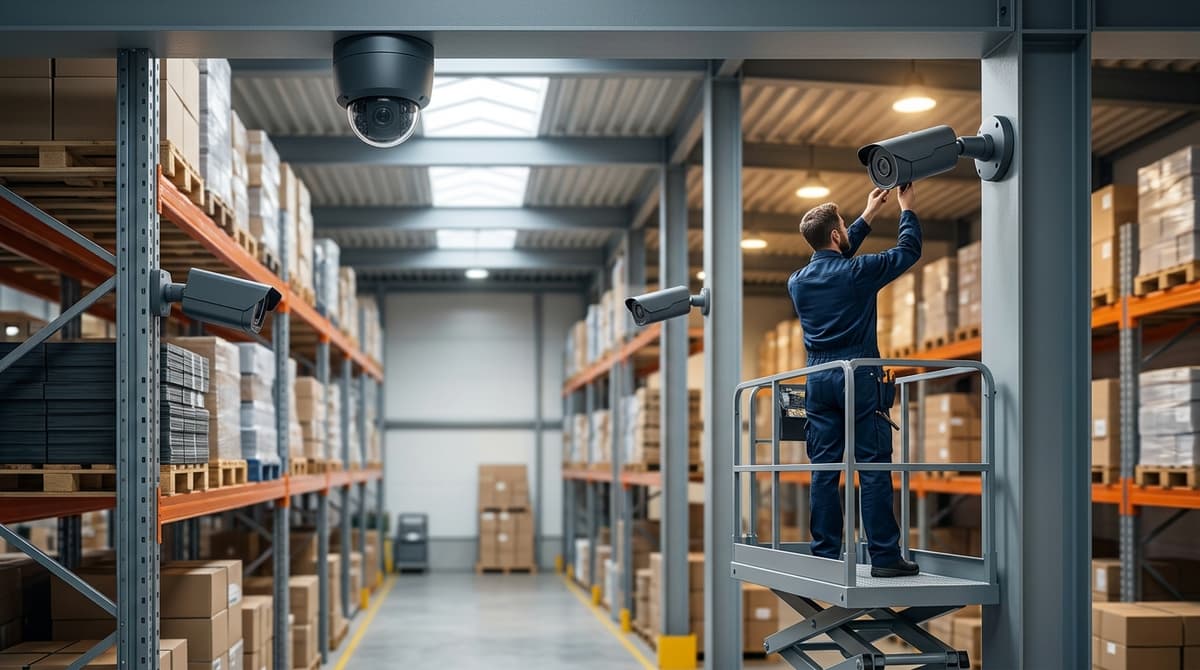
A warehouse needs different cameras for different zones, not one model repeated across the site: the loading dock, perimeter and entrances, racking aisles and high-bay open floor each have their own job, and you choose the camera by what that zone must show. The recorder, PoE capacity and storage then need sizing to match the cameras you've chosen, or the best lenses on site won't give you usable footage. This guide sets out the selection logic and placement thinking, not a lab-tested "best camera", so you won't find invented benchmarks here.
Which CCTV cameras for a warehouse do you actually need?
Split the site into zones and pick the camera for each one: loading dock, perimeter and entrances, aisles, high-bay open floor, and stock cage or office. Pelco names loading docks, entry and exit points, and perimeters as priorities, and cites infrared and rules-based analytics for watching them.
The form factors below are general guidance, not a ranking:
- Aisles and stock cage: turret or dome. Both suit indoor mounting. A dome hides which way the lens points, while a turret is generally simpler to aim. Tall racking breaks sight lines, so expect to need more cameras than floor area suggests.
- Perimeter and dock doors: bullet. It works as a visible deterrent and mounts easily on a bracket. It is more exposed to weather and knocks, so check the IP rating on the datasheet.
- High-bay open floor: multi-sensor. One housing covers a wide volume on a single cable run. Cisco's MV84X datasheet describes four cameras combining to 20MP. The trade-off is that one fault takes out several views at once.
Our own product list here covers recorders rather than cameras, such as the Prolux 16-channel ePoE NVR. To choose the cameras, browse the range at clearsecurity.co.uk or ask for a suggested system.
How do you cover high ceilings without blind spots?
Use fewer, wider-view cameras for open floor space, and accept that the higher you mount, the more coverage you gain and the less facial or plate detail you keep.
Mounting height is guidance only. Detail at floor level depends on the lens, sensor and resolution of the camera you choose, so check the datasheet before assuming a camera will identify someone from a high bracket. Where identification matters, such as dock doors and pedestrian entrances, add lower, dedicated cameras instead of stretching one high camera too far.
A multi-sensor option
Cisco Meraki's MV84X datasheet describes one camera body carrying four sensors, with a combined 20MP resolution and 360-degree analytics, and names warehouses among its target spaces. It is a third-party example, not something we stock. It is also a cloud-managed system, and we have not verified how it would work with our NVRs, so confirm recorder compatibility before planning around it.
Blind-spot checklist
General guidance to run through before you commit to positions:
- Lighting and reflections: glare from loading-bay doors, skylights or shiny floors can wash out a view that looks fine on a plan.
- Forklift and mast obstruction: raised masts can block a camera's line of sight down an aisle.
- Mezzanine undersides: the floor above shades the area below it from overhead cameras.
- Door openings: open roller doors change both the light and the field of view.
Do a site walk with a live view before drilling anything. Have your electrician or installer test each position temporarily, because ceiling height alone cannot predict what the image will show. Browse the range at https://clearsecurity.co.uk or ask for a suggested system.
How should you camera aisles and monitor inventory?
Aim cameras down the aisle axis from the end of each run. A camera mounted across the racking only sees the next bay, whereas one looking along the aisle covers the whole run. This is general placement guidance, so check the view on site before fixing anything permanently.
Where stock actually goes missing
Prioritise three places over blanket coverage:
- Goods-in and dispatch route: Pelco points to docks as the place to make sure shipments arrive safely, which is also where mis-picks and short deliveries get argued over.
- High-value cages: one camera on the door, one inside.
- After-hours movement: Pelco describes "rules-based analytics" for entry points, and some recorders offer human and vehicle detection, such as the Dahua 4-channel Penta-brid DVR.
Be honest about what CCTV does for inventory
CCTV supplies evidence for investigations and disputes such as damage claims and mis-picks. It does not replace a WMS or a stock count. Use it by timestamping footage against dock-door or shift logs, so a discrepancy becomes a short, specific search.
Handling cctv footage from a warehouse
Label the incident time window, export only that clip, and keep the untouched original on the recorder. Record who exported it and why. Because footage of staff is personal data, handle requests for it under UK GDPR and the ICO's CCTV guidance.
Which recorder, PoE and storage setup suits a warehouse?
Choose by channel count, incoming bandwidth and cabling: new network cable suits an NVR, while existing coax suits a hybrid DVR. Pick the recorder for the camera count you will have in two years, not today.
- Prolux 4-channel 8MP PoE NVR: four built-in PoE ports and 80 Mbps incoming bandwidth. It suits a small unit or a single zone, such as a loading door and yard.
- Prolux 16-channel 8MP ePoE NVR: 16 ePoE ports and 160 Mbps input. It suits a multi-zone warehouse with aisles, docks and a perimeter. Our listing doesn't detail what ePoE adds, so check the datasheet for cable-run limits before you plan long runs.
- XVR-3108AD-4MP 8-channel hybrid DVR: takes TVI, AHD, CVI, CVBS and IP cameras, records at 4MP and has 8 channels. It suits a unit with coax already in place. No PoE ports are listed, so any IP cameras would need separate power.
Spread evenly, 160 Mbps across 16 cameras leaves 10 Mbps each, against 20 Mbps each for four cameras on the 80 Mbps model. Actual camera bitrates depend on codec and settings, so compare them with the camera datasheet.
For storage, retention is roughly bitrate × 86,400 seconds × cameras × days, divided into bits per byte. Run it with your cameras' real bitrates and confirm the recorder's drive capacity on its datasheet. Your own electrician or installer should fit and power the kit.
Are CCTV cameras allowed in a warehouse, and what must you do?
Yes, employers can use CCTV in a warehouse if it is justified and proportionate and handled in line with UK GDPR and the ICO's guidance. So when people ask whether CCTV cameras are allowed in the workplace, the answer is yes, with conditions. This is general guidance, not legal advice. Our CCTV Law UK article covers the legal detail.
The practical duties
- A clear purpose. Write down why the cameras are there, for example stock theft or forklift and pedestrian safety. If the footage later gets used for something unrelated, such as routine monitoring of staff, that needs separate justification.
- Signage. Put visible signs at entrances and in covered areas, saying who operates the system and why. Our CCTV Signage article covers what to put on them.
- Telling staff. Explain what is recorded, why, and who can view it, ideally in a written policy staff can read.
- Restricted access. Limit who can view or export footage, and keep a record of who does. Warehouse CCTV footage can identify people, so treat it as personal data.
- A retention policy. Set a deletion period based on your purpose. No single period suits every site, so choose the shortest one that does the job.
Do cameras have to be visible?
Signage is expected, so people should know they are being recorded. Covert recording is exceptional, such as a specific suspected crime where open cameras would defeat the purpose. Read the ICO's video surveillance code before considering it.
Audio and sensitive areas
As general guidance, avoid audio recording because it is far more intrusive than video. Do not put cameras in toilets or changing areas. If you think you have a special case, take advice first.
Browse the range at clearsecurity.co.uk or ask for a suggested system for your warehouse.
Related products
Related products from our own range:
- XVR-3108AD-4MP 8CH 4MP Hybrid CCTV DVR — 8-channel hybrid CCTV DVR supporting TVI, AHD, CVI, CVBS and IP cameras, 4MP recording, HDMI/VGA output. Prices include VAT. Free UK delivery over £100.
- Prolux PXN-2104HS-4P/4K 4 Channel 8MP 4K PoE IP CCTV NVR — 4-channel IP NVR supporting up to 8MP network cameras; Built-in 4 PoE ports with Plug & Play camera connection; Incoming bandwidth up to 80 Mbps for stable video recording; HDMI and VGA output
- Prolux PXN-5216-16P-4KS2E 16 Channel 8MP ePoE NVR — 16-channel 8MP IP NVR with 16 built-in ePoE ports, 160 Mbps input and HDMI and VGA output. Prices include VAT. Free UK delivery over £100.
- 4K DVR 4 Channel Penta-brid, AI Face Recognition – Dahua — 4-channel Penta-brid 4K DVR for HDCVI, AHD, TVI, CVBS and IP cameras up to 8MP. Face recognition, human and vehicle detection. Needs one SATA drive, up to 10TB.
Recommended products
From our own range — picked for what this guide covers.
- XVR-3108AD-4MP 8CH 4MP Hybrid CCTV DVR8-channel hybrid CCTV DVR supporting TVI, AHD, CVI, CVBS and IP cameras, 4MP recording, HDMI/VGA output. Prices include VAT. Free UK delivery over £100.View product →
- Prolux PXN-2104HS-4P/4K 4 Channel 8MP 4K PoE IP CCTV NVR• 4-channel IP NVR supporting up to 8MP network cameras • Built-in 4 PoE ports with Plug & Play camera connection • Incoming bandwidth up to 80 Mbps for stable video recording • HDMI and VGA outputView product →
- 4K DVR 4 Channel Penta-brid, AI Face Recognition – Dahua4-channel Penta-brid 4K DVR for HDCVI, AHD, TVI, CVBS and IP cameras up to 8MP. Face recognition, human and vehicle detection. Needs one SATA drive, up to 10TB.View product →
Frequently asked questions
Which CCTV camera is best for warehouse use?
No single model is best, and we haven't lab-tested one. Choose per zone: Pelco names loading docks, entry/exit points and perimeters as priorities, and cites infrared and rules-based analytics. Generally, turret or dome cameras suit indoor aisles, bullets suit perimeters, and multi-sensor cameras suit open volumes.
Are CCTV cameras allowed in the workplace?
Generally yes in the UK, provided the use is lawful and proportionate. Because cameras capture identifiable people, data protection rules apply. That usually means a clear purpose, informing staff and visitors, and controlled access to footage. Check the ICO's current guidance before installing, particularly for cameras covering staff areas.
Do CCTV cameras have to be visible?
Not necessarily, but people should normally be told they are being recorded, typically through clear signage. Hidden or covert recording is far more restricted and suits only exceptional cases. For a warehouse, visible cameras with signs at entrances and the dock are the safer starting point. Confirm requirements with ICO guidance.
What recorder do I need for a warehouse CCTV system?
Match the recorder to your cameras. The Prolux PXN-2104HS-4P/4K is a 4-channel IP NVR with four PoE ports and up to 80 Mbps incoming bandwidth. The XVR-3108AD-4MP is an 8-channel hybrid recorder that suits mixed analogue and IP cameras.
How much does it cost to run a CCTV camera?
We can't give a reliable figure without a camera's rated wattage, which varies by model. Running cost comes mainly from the electricity used by the camera (via PoE or a power supply), the recorder and any infrared illumination. Check each datasheet's power draw, then multiply by your tariff and hours of operation.
Sources & references
Shop this topic
- cctv
- cameras
- warehouse
Written by
Clear Security Editorial Team
Buying guides researched against the equipment we stock, with every specification checked back to the manufacturer's datasheet and UK guidance reviewed before publication.
Related reading
- 4MP vs 8MP CCTV Cameras: What the Difference Means in 2026what does 4mp vs 8mp mean for cctv cameras
- Best Business CCTV Cameras UK 2026: Types & Specsbest business cctv cameras
- GDPR and CCTV Cameras: UK Buyer's Guide for 2026gdpr cctv cameras
- Home CCTV Systems UK 2026: Wired or Wireless?home cctv systems uk
- Best CCTV System 2026: How to Choose for UK Homes and Shopswhat cctv system is the best
- CCTV Christmas Shopping Season 2026: UK Readiness Guidecctv during christmas shopping season uk