
what is a cctv monitor
What Is a CCTV Monitor? Display Types and Buying Guide
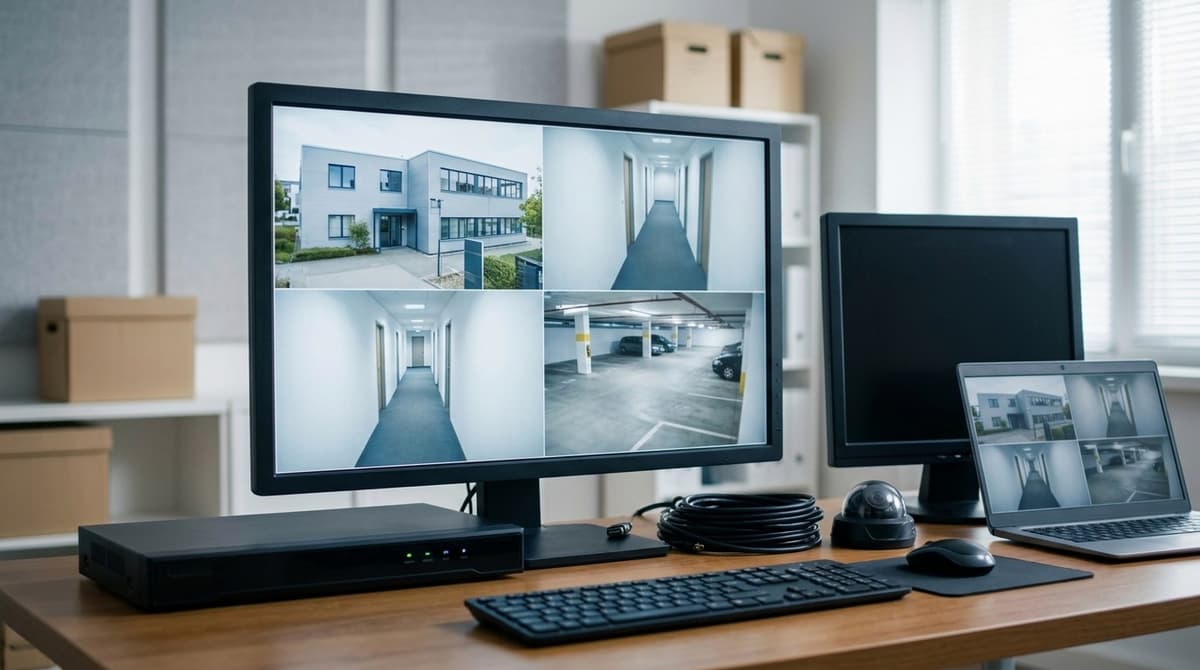
A CCTV monitor is a display that shows live or recorded footage from a DVR, NVR or PC, forming the screen end of a closed-circuit system.
On this page
- What is a CCTV monitor, and how does it differ from a TV or computer screen?
- Can you use any monitor for CCTV?
- What types of CCTV monitor are there?
- How do you choose a CCTV monitor for an existing system?
- Which CCTV monitor suits a home or small business, and what about cheap ones?
- New unit: Dahua 22-inch
- Budget route: refurbished AOC 23-inch
- Do you need a monitor at all, and why might your CCTV monitor not work?
- No picture? Work through it in this order
- Placement and the law
- Related products
A CCTV monitor is a display that shows live or recorded footage from a DVR, NVR or PC, forming the screen end of a closed-circuit system. Most ordinary monitors and TVs can do the job as long as they have an input your recorder can drive, typically HDMI or VGA, but a security-grade unit is built for continuous, round-the-clock use. That durability, plus the right connections, is what to check before you buy.
What is a CCTV monitor, and how does it differ from a TV or computer screen?
A CCTV monitor is the screen at the end of the closed circuit that shows live or recorded video from the recorder. DTiQ describes it as the display for real-time and recorded footage from security cameras, so "monitor" in CCTV means the viewing end of the system, not the camera or the recorder.
The hardware gap is narrower than most buyers expect. AllTech Solutions describes surveillance monitors as built to run 24/7, tuned for extended viewing and equipped with HDMI, VGA and BNC inputs, unlike a standard computer display. The real differences are duty cycle and connectors, not the picture itself.
Can you use any monitor for CCTV?
Almost any display will show the picture, provided it passes two checks:
- Input match: the monitor needs a socket that matches your recorder's video output, usually HDMI or VGA. If the two don't share a connector, you'll need a converter.
- Continuous running: a screen left on around the clock is a different load from one used for an evening. Check the manufacturer's guidance, or choose a model sold for surveillance use.
A spare computer monitor or TV is a reasonable starting point for a small home system. For a permanently displayed view, a purpose-made screen such as the Dahua DHI-LM22-A200D suits better. It is a 22-inch, 1920 × 1080 panel with HDMI and VGA inputs and a 100 × 100mm VESA mount. On a tighter budget, the 23 inch refurbished LCD monitor is tested for normal working condition and works with DVRs, NVRs and PCs.
What types of CCTV monitor are there?
CCTV monitors fall into four practical types: dedicated security screens, BNC-input monitors, multi-view video-wall panels, and models with loop-through outputs.
| Type | Typical use | Inputs | Trade-off |
|---|---|---|---|
| Dedicated security monitor | Control rooms, reception desks, home setups | HDMI, VGA | Single screen; no direct analogue input |
| BNC-input monitor | Analogue cameras wired straight to the screen | BNC, often with VGA | Little point if a recorder sits in between |
| Multi-view / video-wall panel | Tiled views of many cameras | Typically HDMI | Larger and costlier; what it can show depends on the recorder's display output |
| Loop-through monitor | Passing a feed on to a second device | Varies by model | Not universal, so check the datasheet |
Most home and small-business systems need only the first row. The Dahua DHI-LM22-A200D is a 22-inch Full HD (1920 × 1080) example with HDMI and VGA inputs and a 100 × 100mm VESA mount. It plugs into a DVR or NVR and can sit on a desk or go on a wall bracket. For a lower outlay, the 23 Inch Refurbished LCD Monitor is sold as tested for DVR, NVR and PC use.
BNC matters only when analogue cameras feed the screen directly. AllTech Solutions lists BNC alongside HDMI and VGA among the input types on surveillance displays. A recorder-based system will normally use HDMI or VGA instead.
Multi-view panels are a type description rather than something to buy by default. A 4K-class display only shows its extra detail if the recorder's display output supports that resolution, so check the recorder's specification first.
A loop-through output sends the incoming signal on to another monitor or recorder, so one feed can serve two destinations.
How do you choose a CCTV monitor for an existing system?
Match the monitor's input to the recorder's output first, then resolution, then duty rating, and finally size against viewing distance.
-
Input to output. Look at the back of the DVR or NVR and note whether it has HDMI, VGA or both. The Dahua DHI-LM22-A200D 22-Inch Full HD VA Monitor has both, so it works with either port. Some surveillance monitors also take BNC, per AllTech, so check the recorder's actual sockets rather than assuming.
-
Resolution. Base this on the recorder's display output and the layout you plan to watch, not on each camera's resolution. Check the recorder's datasheet for its maximum output resolution and the monitor's documentation for the input resolutions it accepts. A 1920 × 1080 panel, like the Dahua above, usually suits small and medium camera counts. Tiles shrink as channels are added: a 4 × 4 grid of 16 cameras on a 1920 × 1080 screen gives each camera 480 × 270 pixels.
-
Duty rating. AllTech describes CCTV monitors as built for 24/7 operation, unlike standard computer displays, which are optimised for shorter sessions. Look for a continuous-operation statement in the datasheet. Our listing for the Dahua model above doesn't state one, so don't assume it is rated for a permanently displayed view. Confirm with the manufacturer's documentation first.
-
Size and viewing distance. A larger panel at the same resolution only enlarges the pixels, so it suits a longer viewing distance rather than adding detail. Pick the size for where you'll sit or stand when watching. If wall-mounting, check the VESA pattern; the Dahua model uses 100 × 100mm.
Which CCTV monitor suits a home or small business, and what about cheap ones?
For a new home or small-office setup, the Dahua DHI-LM22-A200D is the straightforward choice. If the aim is the lowest outlay, a refurbished AOC 23-inch screen does the same job.
New unit: Dahua 22-inch
The Dahua DHI-LM22-A200D 22-Inch Full HD VA Monitor runs at 1920 × 1080. HDMI and VGA inputs let it connect to a computer, a DVR or an NVR, so it works whichever recorder you already own.
It has a 100 × 100 mm VESA mount, which means a wall bracket or monitor arm can be fitted by your own electrician or installer. As general guidance, VA panels give good contrast, which helps with dark scenes such as night footage.
Budget route: refurbished AOC 23-inch
The 23 Inch Refurbished LCD Monitor for CCTV PC Office Display is an AOC unit, listed for DVR, NVR and PC use and tested for normal working condition. It is previously used stock, so it suits a back office or a second viewing screen well.
Check the product page's input list against your recorder's video output before ordering. Prices on both pages include VAT and can change, so read the live figure there rather than relying on one quoted here.
Do you need a monitor at all, and why might your CCTV monitor not work?
A phone or tablet app can show most modern systems, but a local monitor still earns its place for setup, a permanent live view and reviewing footage without the network. Remote viewing is now a normal part of how recorders are used, as DTiQ notes in describing the widening role of the CCTV monitor. As general guidance, a screen is easiest when you are aiming cameras, because you see the framing change as you adjust. It also keeps working when the broadband is down.
No picture? Work through it in this order
- Input source: most monitors have several inputs, so check the screen is set to the one your recorder is plugged into rather than on auto-detect.
- Cable and port: confirm HDMI goes to HDMI and VGA to VGA, and that neither plug is loose. If the recorder has both outputs, try the other.
- Resolution: a recorder set to output a resolution the monitor does not support can leave a blank or "out of range" screen. The Dahua DHI-LM22-A200D is a 1920 × 1080 panel, so check the input resolutions listed in its documentation. Then lower the recorder's output setting to one of them.
- Power and sleep: check the monitor's power light and its standby or sleep setting, and the recorder's screen-saver timeout.
- Swap parts: try a second cable, then a known-good display, to see whether the fault is the monitor, the lead or the recorder.
Placement and the law
Position the screen so only authorised people can see it. If a live view faces a shop floor or reception, it may show footage to people with no business seeing it, which can sit badly with UK GDPR and the ICO's CCTV guidance. Whether signage is needed depends on the installation. Businesses, and cameras that capture areas beyond your own property, will generally need it, so check the ICO's guidance for your own setup.
Related products
Related products from our own range:
- 23 Inch Refurbished LCD Monitor for CCTV PC Office Display — AOC 23 inch refurbished LCD monitor for DVR, NVR and PC use, tested for normal working condition. Prices include VAT. Free UK delivery over £100.
- Dahua DHI-LM22-A200D 22-Inch Full HD VA Monitor — Dahua 22-inch Full HD VA monitor, 1920 × 1080, for office work and CCTV viewing. HDMI and VGA inputs suit computers, DVRs and NVRs; 100 × 100mm VESA mount.
Recommended products
From our own range — picked for what this guide covers.
Frequently asked questions
What is a CCTV monitor?
A CCTV monitor is a display that shows live or recorded footage from a DVR, NVR or PC. It sits at the end of the closed circuit, so video goes to a specific screen rather than being broadcast. Many ordinary monitors and TVs can do the job if the inputs match, but security-grade units are built for continuous use.
What is monitor in CCTV?
In CCTV, the monitor is the screen you watch footage on. It is not the camera that captures the video or the recorder that stores it. It connects to the DVR or NVR, usually by HDMI or VGA, and shows live views or playback. Security-grade models may also offer BNC inputs.
What is CCTV camera monitor?
A CCTV camera monitor is the display used to view what your cameras are capturing. The cameras feed the recorder, and the recorder drives the monitor, so you can see one or several camera views on a single screen. A PC can also drive the display, depending on your setup.
Can you use any monitor for CCTV?
Yes, provided it has an input your recorder can drive, typically HDMI or VGA on DVR and NVR outputs. Check the ports on both devices before buying. For all-day viewing, the 23 Inch Refurbished LCD Monitor for CCTV PC Office Display is an AOC unit for DVR, NVR and PC use, tested for normal working condition.
Which is better for CCTV monitor or TV?
Neither wins outright. A TV suits occasional viewing if it has the right input. A CCTV monitor is better when the screen stays on all day, as surveillance monitors are described as built for 24/7 use with HDMI, VGA and BNC inputs. Choose based on running hours and the ports you need.
Sources & references
- How CCTV Cameras Work & Their Benefits | CCTV.co.uk
- 98,051 Cctv Camera Monitor Royalty-Free Images, Stock Photos & Pictures | Shutterstock
- What Is CCTV Camera Surveillance & How It Works
- What is a CCTV Monitor and Its Role in Cloud Video ...
- CCTV Monitor – The Essential Display For Modern Surveillance Systems | AllTech Solutions
- Find the Perfect CCTV Monitor: Key Features & Selection Tips
- What is CCTV (closed-circuit television)? | Definition from TechTarget
- Closed-circuit television
- what
- is
- cctv
- monitor
Written by
Clear Security Editorial Team
Buying guides researched against the equipment we stock, with every specification checked back to the manufacturer's datasheet and UK guidance reviewed before publication.
Related reading
- Best CCTV System 2026: How to Choose for UK Homes and Shopswhat cctv system is the best
- CCTV Lens Size for Face Recognition at 10 Metres (2026)what lens size cctv camera do i need to see a face at 10 metres
- 4MP vs 8MP CCTV Cameras: What the Difference Means in 2026what does 4mp vs 8mp mean for cctv cameras
- What Is a Camera Bracket? UK CCTV Guide 2026what is a camera bracket?
- What Is an NVR Recorder: IP Camera Recordingwhat is a nvr recorder
- What Is a CCTV Camera Kit? 2026 Guidewhat is a camera kit?