
what is a camera kit?
What Is a CCTV Camera Kit? 2026 Guide
A CCTV camera kit, in the security sense, is a pre-matched bundle sold as one system: cameras, a recorder (DVR or NVR), and the cabling or PSU needed to…
On this page
- What does "camera kit" actually mean here?
- What is in a CCTV camera kit?
- Residential vs commercial: does the property type change what kit you need?
- Residential
- Commercial
- Do I need planning permission or insurance sign-off for a camera kit?
- When planning permission is generally not required
- Data protection is separate from planning
- Insurance: expect questions, not automatic sign-off
- Recommended kit
A CCTV camera kit, in the security sense, is a pre-matched bundle sold as one system: cameras, a recorder (DVR or NVR), and the cabling or PSU needed to connect them, rather than a single lens or accessory.
That's worth stating upfront because searching "camera kit" also turns up two unrelated products — a photography kit lens bundle (a camera body sold with a starter zoom CCTV lens calculator) and Snap's Camera Kit, a developer SDK for adding AR Lenses to apps — neither of which is what UK CCTV buyers and installers need.
This article covers the security meaning only: what's actually in the box, how residential and commercial kits differ, and how to choose one that matches your property and budget.
What does "camera kit" actually mean here?
A CCTV camera kit is a pre-matched bundle of cameras, a recorder, cabling and power supply sold together as one complete system, designed so all components work together without compatibility guesswork.
In security and CCTV, a camera kit is a pre-matched bundle — cameras, a recorder (DVR or NVR), the cabling and a power supply — sold together as one system, not a single accessory you add to something else you already own. The point of buying it as a kit rather than piecing it together is that the camera resolution, recorder channels, and cabling are already matched to work together, so you're not left guessing whether a given camera will run on a given recorder.
Kit camera definition, disambiguated: the term surfaces at least three unrelated meanings, and it's worth naming them so you land on the right one. Photographers use "kit lens" for the starter zoom lens bundled with a new camera body, typically an 18–55mm range as covered in Wikipedia's kit lens entry. Developers use "Camera Kit" for Snap's cross-platform SDK, which lets iOS, Android and web apps add AR Lenses, per Snap's own Camera Kit documentation — that's what answers "what is camera kit snap ar" and "what is a camera kit plugin," and it has nothing to do with security hardware.
This article, and this site's catalogue, is about the third meaning: CCTV camera kits for securing a home or business. That's what "what is a camera kit," "what is in a camera kit" and "kit camera definition" mean for a UK buyer comparing surveillance equipment rather than lenses or an AR SDK.
Key takeaway: a CCTV camera kit is a complete recording system — cameras, recorder, storage and cabling matched and sold as one unit — not a standalone accessory. As an example of what that looks like in practice, the Hikvision 4-Channel 3K CCTV Kit — 1 Camera + 1TB Recording pairs a 4-channel 5MP DVR with a pre-installed 1TB drive and a matched turret camera, plus the HDMI and power leads needed to get it running.
What is in a CCTV camera kit?
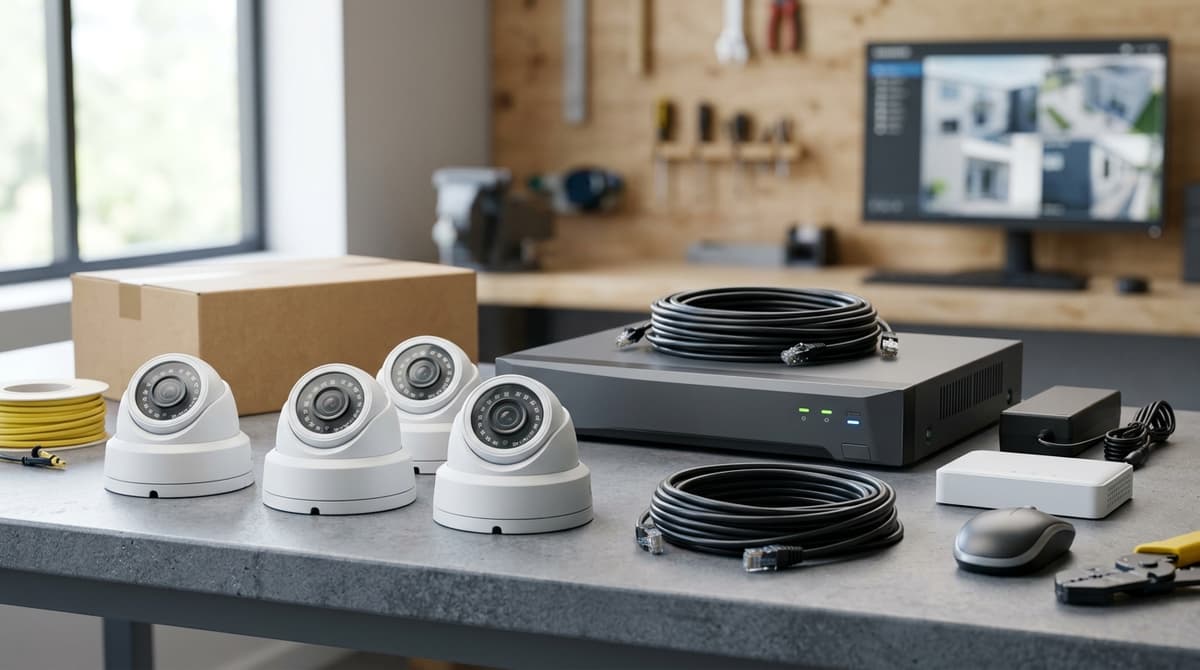
A CCTV camera kit includes a recorder (DVR or NVR), one or more cameras, cabling, power supplies and mounting hardware, all pre-validated to work together. A hard drive may or may not be included depending on the specific kit variant.
A CCTV camera kit bundles a recorder — either a DVR or an NVR — with one or more cameras and the cabling and power supplies needed to connect them, so everything ships as a matched, working set rather than separate parts you have to spec yourself. This is the surveillance equivalent of what "kit" means in photography retail, where a kit lens or camera bundle is sold pre-matched to the body rather than chosen piece by piece — the same logic applies here: the recorder, camera and cabling are pre-validated to work together.
Clear Security's own Hikvision 4-Channel 3K CCTV Kit — 1 Camera (IDS-7204HQHI Recorder) shows this pattern concretely: a Hikvision 4-channel 5MP 1U H.265 AcuSense DVR, one Hikvision 3K Two Way Audio Fixed Turret camera, and free extras of a 1.5m 4K 60Hz HDMI cable, a PSU-12V-1A-UK-BOX power supply, and an RG cable for the camera run. Nothing extra to source before installation day — an electrician or installer just needs to run the cable and mount the hardware, and Hikvision's own installation guide covers the connection steps.
A hard drive is the one thing that isn't always in the box. The same recorder and camera pairing is also sold as the Hikvision 4-Channel 3K CCTV Kit — 1 Camera + 1TB Recording (IDS-7204HQHI Recorder), which adds a 1TB hard drive pre-installed in the DVR rather than left for the buyer to fit separately. Choosing between the two comes down to whether you already have a compatible drive or storage retention plan sorted, or want the recorder ready to record on delivery.
Larger kits follow the identical structure at a higher channel count and resolution. The Hikvision 8-Channel 4K CCTV Kit — 1 Camera (IDS-7208HUHI-M1/XT Recorder) pairs an 8-channel 8MP 1U H.265 AcuSense DVR with a Hikvision 4K Two Way Audio Fixed Turret camera, plus the same HDMI cable, PSU and RG cable extras — it simply has headroom for more cameras added later.
For a system sized to your property, browse the range at clearsecurity.co.uk or ask for a suggested system.
Residential vs commercial: does the property type change what kit you need?
Yes — property type changes camera count, coverage angles and legal duties, not just how much you spend. A homeowner and a shop owner asking "what is a camera kit?" often end up buying very different systems, even at similar price points.
Residential
For most homes, the sensible entry point is a single-camera kit covering the front door or driveway, scaled up as needs grow. The Hikvision 4-Channel 3K CCTV Kit ships with a 4-channel recorder and just one camera fitted, leaving three spare inputs so a second camera at the back door or a third on a side return can be added later without swapping the recorder.
Legally, domestic CCTV that only looks at your own property and its boundary generally sits outside UK GDPR/ICO registration duties. But if a camera's field of view catches a neighbour's garden, window, or the public pavement, that footage can trigger data protection obligations for the household, as set out in the ICO's guidance for domestic CCTV users.
Getting the mounting angle right at install time avoids this entirely for most homes — a few degrees of tilt is often the difference between exempt and regulated.
Take-away: a residential kit is about coverage of your own boundary first, camera count second — check the ICO guidance before angling a camera towards a shared driveway or a neighbour's wall.
Commercial
Commercial sites carry statutory duties that residential ones don't, because a business processing CCTV footage of staff, customers or visitors is a data controller under UK GDPR regardless of camera count. That typically means a documented purpose, visible signage, and a defined retention period — obligations that don't disappear just because the site is small.
Camera counts also scale differently: covering till points, stockrooms, fire exits and external perimeters on a single retail unit can easily need six to eight camera positions rather than the one or two typical of a house, which points toward an 8-channel recorder rather than a 4-channel one from the outset.
Buyers weighing up entry-level options against a fuller commercial specification can browse the range at Clear Security or ask for a suggested system sized to the number of entrances, tills and stock areas involved.
Do I need planning permission or insurance sign-off for a camera kit?
Fixed CCTV on a private dwelling pointed at your own property is generally treated as permitted development and needs no planning permission. Insurers typically do not require formal sign-off but may ask about working CCTV during claims.
Most home and small business CCTV kits don't need planning permission, but a handful of situations do, and your insurer may still ask questions when you make a claim. The general rule: fixed CCTV on a private dwelling or standard commercial unit, pointed at your own property, is treated as permitted development rather than something requiring a planning application.
When planning permission is generally not required
Planning permission is generally not required for a CCTV camera kit fitted to a house or typical small business premises, provided the cameras are mounted on the building itself and aimed at the owner's own property, boundary or entrance.
This covers the overwhelming majority of the kits sold for home and shop use — a turret or bullet camera on a soffit, fascia or wall bracket, wired back to a DVR or NVR inside.
Once you start pointing cameras deliberately across a neighbour's garden, onto a public footpath as a primary view, or you're on a listed building or in a conservation area, that's when it's worth checking with your local planning authority before fitting anything, since those situations sit outside the general exemption.
Data protection is separate from planning
Planning permission and data protection law are two different things, and a kit that needs no planning consent can still trigger obligations under UK GDPR if it captures images beyond your own boundary — that's a data-handling question, not a construction one, and is covered by the ICO's CCTV guidance rather than a council planning department.
Insurance: expect questions, not automatic sign-off
Insurers don't typically require formal "sign-off" for a domestic or small commercial camera kit, but many will ask whether you have working CCTV as part of a claim or a premium assessment, especially after a break-in.
Keep the installation manual or datasheet from your recorder and cameras — for a kit like the Hikvision 4-Channel 3K CCTV Kit with 1TB recording — as evidence of what was fitted and when, since insurers may want proof the system was operational rather than a specific certification.
A qualified electrician or installer should always carry out the actual fitting and cabling; browse the range at Clear Security or ask for a suggested system if you're unsure which kit matches your property.
Recommended kit
For the setup above, this is the kit we'd recommend from our own range:
- Hikvision 4-Channel 3K CCTV Kit — 1 Camera + 1TB Recording (IDS-7204HQHI Recorder) — Hikvision 4-ch 5mp 1U H.265 AcuSense DVR. 1× Hikvision 3K Two Way Audio Fixed Turret. 1TB hard drive pre-installed. free extras: 1× HDMI Cable High Speed 1.5m 4K 60Hz Ethernet HDMI-A Male to Male Blac
- Hikvision 4-Channel 3K CCTV Kit — 1 Camera (IDS-7204HQHI Recorder) — Hikvision 4-ch 5mp 1U H.265 AcuSense DVR. 1× Hikvision 3K Two Way Audio Fixed Turret. free extras: 1× HDMI Cable High Speed 1.5m 4K 60Hz Ethernet HDMI-A Male to Male Black, 1× PSU-12V-1A-UK-BOX, 1× RG
- Hikvision 8-Channel 4K CCTV Kit — 1 Camera (IDS-7208HUHI-M1/XT Recorder) — Hikvision 8-ch 8MP 1U H.265 AcuSense DVR. 1× Hikvision 4K Two Way Audio Fixed Turret. free extras: 1× HDMI Cable High Speed 1.5m 4K 60Hz Ethernet HDMI-A Male to Male Black, 1× PSU-12V-1A-UK-BOX, 1× RG
- Hikvision 8-Channel 4K CCTV Kit — 1 Camera (IDS-7208HUHI-M1/E Recorder) — Hikvision 8-ch 8MP 1U H.265 AcuSense DVR. 1× Hikvision 4K Two Way Audio Fixed Turret. free extras: 1× HDMI Cable High Speed 1.5m 4K 60Hz Ethernet HDMI-A Male to Male Black, 1× PSU-12V-1A-UK-BOX, 1× RG
This article was researched and written by IT Master.