
video door entry system with lock release
Video Door Entry with Lock Release UK
A video door entry system with lock release pairs a door station (camera and call button) with an indoor monitor or app and a relay output that releases an…
On this page
- What is a video door entry system with lock release, and how does it fit alongside CCTV?
- Intercom camera versus CCTV
- The "wireless" caveat
- Two products from our range, and what to verify
- Which integration route suits an existing CCTV/NVR setup?
- Route 1: IP door station on the same PoE switch
- Route 2: 2-wire retrofit
- Route 3: separate intercom plus a door camera
- How do you wire the lock release: fail-safe or fail-secure?
- Wiring sequence
- Check what's in the box
- If the door lock keeps opening
- How much PoE and network capacity does a door station need?
- Cable and retrofit
- NVR channels and storage
- Wi-Fi door stations
- What should you check before buying? (compatibility checklist)
- Related products
A video door entry system with lock release pairs a door station (camera and call button) with an indoor monitor or app and a relay output that releases an electric strike or maglock. It can sit on the same network as your CCTV, but whether the door station's video appears on your NVR depends on the model, so check the datasheet for ONVIF or RTSP support before you buy. The intercom camera is there to identify the caller, while your CCTV cameras provide the evidence. The lock, its power supply and the exit route need planning just as carefully as the camera side.
What is a video door entry system with lock release, and how does it fit alongside CCTV?
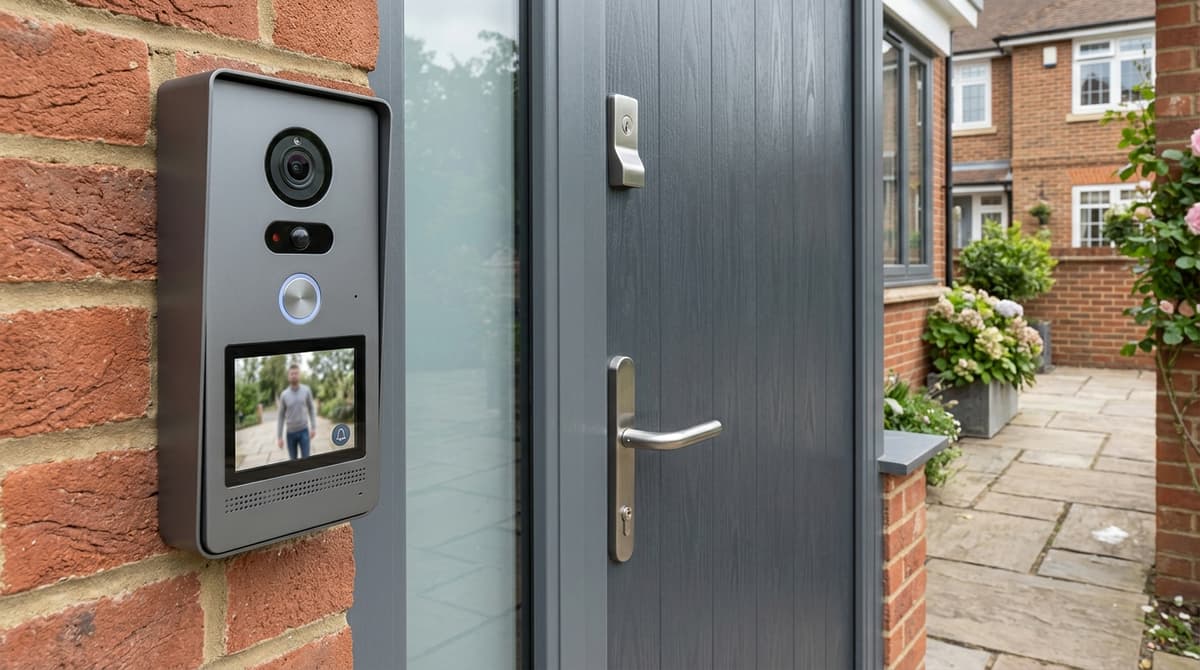
It is a camera door station, an indoor monitor or app, and a relay output that releases an electric strike or maglock. The CDVI 2EASY kit shows the anatomy: a door station, an internal monitor, a power/bus combiner, and a free app that can receive calls and release locks remotely.
The relay is what makes it "with lock release". Pressing a button on the monitor or in the app triggers the relay output, which releases the lock. Whether the release is timed, and what lock types it suits, depends on the model. Some kits list the lock itself as a separate purchase, so check the parts list.
Intercom camera versus CCTV
The two do different jobs. The intercom camera exists to identify a caller before you open the door, while CCTV cameras exist to record evidence of what happened. A door-station camera is built around one moment at one door. Cover the approach, car park and perimeter with proper CCTV.
The "wireless" caveat
Not every "wireless" model has an integrated door release, so check the product description for a relay or lock output. Budget Wi-Fi doorbell intercoms may depend on a separate smart lock instead. On a commercial door, the release wiring, power supply and any exit arrangement must follow the instructions for your chosen lock and controller. Your own electrician or installer should fit and test it.
Two products from our range, and what to verify
The Hikvision DS-KIS604-P(C) kit pairs a one-button door station with a 7" indoor monitor and Hik-Connect app control. The modular door station lists a 2MP fisheye camera, two-lock control, standard PoE power and IP65 protection.
The listings confirm those features, not recording. Before assuming the door-station video will appear on your NVR, check both datasheets for ONVIF or RTSP support and any firmware requirements. If the station is PoE-powered, allow for it in your switch's PoE budget.
Which integration route suits an existing CCTV/NVR setup?
Choose an IP door station on your existing PoE network if you can run data cable to the door; choose 2-wire only when old door-entry cable has to be reused.
Route 1: IP door station on the same PoE switch
This puts the door station on the same network as your cameras, so one cable carries power and data. Check the switch's spare ports and total PoE budget before you order. The sum is the switch's total PoE budget minus the combined draw of your cameras, compared with the door station's datasheet figure. Two models suit this route:
- The Hikvision Modular IP Video Intercom Door Station has a 2MP fisheye camera with IR, standard PoE power, IP65 protection and two-lock control. It is configured remotely through a web interface.
- The DS-KV8413-WME1 has four call buttons, a 2MP camera with IR illumination and a built-in Mifare card reader, so it is described as a multi-user entry station.
The catalogue confirms these specifications. It does not confirm that either door station's video can be recorded on your NVR. Before ordering, check the datasheet and ask three questions:
- Does the door station offer an ONVIF or RTSP stream?
- Does your NVR's firmware accept it as a channel?
- Does the NVR have a spare channel licence?
We have not tested these combinations, so treat them as checks rather than assumptions.
Route 2: 2-wire retrofit
When the old door-entry cable is your only path to the door, 2-wire avoids a new PoE cable run calculator. The CDVI 2EASY kit is 2-wire and non-polarised, has no annual subscription, suits up to 128 apartments and uses the VDP Connect app, per CDVI's product page.
That page describes the 2-wire connection and the app features. It does not say the kit can feed an NVR, so confirm recording compatibility with CDVI and your NVR's manufacturer before counting on it.
For a single house that stays in the Hikvision ecosystem, the DS-KIS702-P(B) 2-wire kit has one call button and supports video calls and door unlocking. It is described as a villa or residential kit, so check that it fits your entrance before choosing it for a commercial one.
Route 3: separate intercom plus a door camera
Keep the existing intercom and add a CCTV camera covering the entrance, recording to its own NVR channel. This may be the least disruptive option, but you run two devices, and the camera cannot answer calls or release the lock.
If you would rather replace the intercom outright, the DS-KIS604-P(C) kit includes a door station and a 7" indoor monitor, and supports Hik-Connect app control. It is described as a villa or house kit, so it suits a single entrance rather than a multi-tenant building.
Lock release wiring should follow the chosen lock's and controller's instructions, fitted by your own electrician or installer. If you are unsure which route fits, browse the range or ask for a suggested system.
How do you wire the lock release: fail-safe or fail-secure?
The lock type decides what happens when power fails: a fail-safe lock releases, a fail-secure strike stays locked. A maglock is a common fail-safe example. It holds only while powered, so a controller, keypad, exit button or emergency release cuts the current and the door opens. This is general guidance, not a product recommendation.
Wiring sequence
- Confirm the lock's voltage. Read 12V or 24V DC off the lock's label or datasheet before buying a power supply.
- Plan a separate supply for the lock. Check the datasheets before drawing it from the door station's feed. A PoE-powered station, for example, is specified with a standard PoE power supply, and the lock's current draw is a separate matter.
- Follow the wiring diagrams for both the lock and the station. The station's relay output switches the lock circuit, and the contact type must match the lock. Whether to add a press-to-exit button depends on the lock and the door's means of escape, so confirm that with a qualified installer first.
- Set the release time. Keep it just long enough to open the door.
Check what's in the box
Kit contents vary, so compare each parts list against your chosen lock before ordering. The Bell System Bellissimo 2-way kit, for instance, is documented as including a surface lock release (Model 203) and a 12 V DC power supply (Model PS4). Other kits may not include either.
If the door lock keeps opening
Work through these possible causes in order:
- A fail-safe lock on a circuit that has lost power will stay open.
- Relay contacts wired the wrong way round can invert the behaviour.
- A release time set too long leaves the door unlocked between visitors.
- A stuck or shorted exit button, where one is fitted, can keep the release circuit active.
For doors on an escape route, agree the failure behaviour with whoever holds the fire risk assessment. Your own electrician or installer fits the hardware, so use the product datasheet or installation guide. To match a station to your lock type, browse the range or ask for a suggested system.
How much PoE and network capacity does a door station need?
Add the door station's PoE draw to every camera's draw, and keep that total comfortably below the switch's rated PoE budget.
Total device draw = (each camera's draw) + (door station's draw), and that must stay under the switch's PoE budget with headroom to spare.
The Hikvision Modular IP Video Intercom Door Station is listed as standard PoE. That doesn't tell you the class or wattage, so read both off the datasheet before sizing the switch. Also check whether the lock outputs run from the PoE feed or need their own supply.
Cable and retrofit
Run Cat5e or Cat6 to the door. Our Cat5e and CAT6 vs CAT6A guides cover when the extra cost of higher categories is worth it. Where re-cabling is impractical, a 2-wire kit such as the Hikvision DS-KIS702-P(B) may let you reuse an existing run. Confirm the permitted cable type and length in its installation guide.
NVR channels and storage
If the door stream will be recorded, the NVR needs a spare channel and enough bandwidth headroom. Check both on the NVR recorder page for your model. Retention follows the usual formula: storage = bitrate × recording time, per channel. Use the bitrate you actually set on the door station, not a guess.
Wi-Fi door stations
Wi-Fi replaces the data cable, not the power. A model such as the Hikvision DS-KV8413-WME1 has built-in Wi-Fi, but it still needs a power feed, so check its datasheet for the supply it requires.
What should you check before buying? (compatibility checklist)
Before buying, check the lock type and voltage, what the kit includes, spare PoE ports, NVR support, subscription costs, IP rating and mounting position.
- Lock type and voltage: Match the release output to your strike or maglock, and confirm whether it suits fail-safe or fail-secure. Some kits offer timed outputs for both, but read the datasheet.
- What's in the box: Look for the lock, power supply and exit button on the kit list. Some listings say outright that lock release is not included.
- PoE and budget: The Hikvision Modular IP Video Intercom Door Station runs from standard PoE, so it needs a spare switch port.
- NVR channel or integration: Verify per datasheet whether the station can join your recorder or only works with its own monitor and app.
- App and subscription: CDVI states its 2EASY kit has no annual subscription. The Hikvision DS-KIS604-P(C) uses the Hik-Connect app. Check the terms of any other kit.
- IP rating: The modular station is IP65, which suits an exposed door.
- Second door: That station offers two-lock control. Other models may not.
- Mounting and view: It has a 2MP fisheye camera. Confirm the recommended height in the installation guide.
Cheap door entry systems are only cheap if the kit list is complete. A low headline price can leave you buying the lock, power supply and exit button separately.
With "wireless" kits, Wi-Fi usually describes the phone link. Check how the lock is wired and powered.
Your electrician or installer will handle fitting the equipment. If the station records, UK GDPR/ICO signage and audio rules apply; the CCTV Law UK guide covers them.
Related products
Related products from our own range:
- Hikvision DS-KIS604-P(C) IP Video Intercom Kit Villa Door Entry — IP video intercom kit for villa or house; Includes door station and 7" indoor monitor; One call button for visitor calls; Supports Hik-Connect mobile app remote control; Stores messages and
- Hikvision DS-KIS702-P(B) 2-Wire IP Video Intercom Kit Villa — 2-wire digital IP video intercom kit; Designed for villa or residential door entry systems; One call button door station for visitor calls; Supports video communication and door unlocking; I
- Hikvision Modular IP Video Intercom Door Station 2MP Fisheye PoE IP65 — Main unit of modular door station 2 MP fisheye camera with IR supplement Two-lock control Standard PoE power supply IP65 protection level Convenient configuration via Web remotely Directly provi
- Hikvision DS-KV8413-WME1 4 Button IP Video Intercom Door Station — 4 button IP villa door station for multi user entry; Built-in WiFi for convenient installation; 2MP HD camera with IR illumination; Integrated Mifare card reader for access control; Supports
Recommended products
From our own range — picked for what this guide covers.
- Hikvision DS-KIS604-P(C) IP Video Intercom Kit Villa Door Entry• IP video intercom kit for villa or house • Includes door station and 7" indoor monitor • One call button for visitor calls • Supports Hik-Connect mobile app remote control • Stores messages andView product →
- Hikvision DS-KIS702-P(B) 2-Wire IP Video Intercom Kit Villa• 2-wire digital IP video intercom kit • Designed for villa or residential door entry systems • One call button door station for visitor calls • Supports video communication and door unlocking • IView product →
- Hikvision Modular IP Video Intercom Door Station 2MP Fisheye PoE IP65Main unit of modular door station 2 MP fisheye camera with IR supplement Two-lock control Standard PoE power supply IP65 protection level Convenient configuration via Web remotely Directly proviView product →
- Hikvision DS-KV8413-WME1 4 Button IP Video Intercom Door Station• 4 button IP villa door station for multi user entry • Built-in WiFi for convenient installation • 2MP HD camera with IR illumination • Integrated Mifare card reader for access control • SupportsView product →
Frequently asked questions
What is video door entry system?
A video door entry system has a door station with a camera and call button, an indoor monitor or app, and a relay output that can release an electric strike or maglock. Its camera identifies the caller. Your CCTV cameras remain the evidence record.
What is the best front door locking system?
No single lock suits every door. With remote release, the main choices are an electric strike or a maglock wired to the intercom relay, and fail-safe or fail-secure operation. Check the exit route first. Some budget Wi-Fi doorbell intercoms rely on a separate smart lock instead.
How to install a door entry system?
Mount the door station, run cabling to the monitor or network, and wire the release output to the lock, following the wiring diagrams for your chosen intercom, lock and power supply. The lock needs a suitable supply, so check its voltage and current in the datasheet. Whether you need an exit button depends on the lock type and the door's means of escape, so confirm this with a qualified installer. We only sell equipment, so your own electrician or installer fits it. Not every wireless model has an integrated release, so check each kit's parts list.
Why is door not locking?
Check the lock type first. A fail-safe lock only holds while powered, so a failed power supply or a relay stuck in release can leave the door open. Then check the relay wiring and any exit button or other release device fitted, and confirm the lock type matches the manufacturer's wiring instructions.
Will the door station video appear on my NVR?
It depends on the model, so check the datasheet for NVR recording, ONVIF or RTSP support before buying, and don't assume it. Our catalogue lists the Hikvision DS-KIS604-P(C) IP Video Intercom Kit as an IP kit for a villa or house with Hik-Connect app control. It doesn't confirm recording on a particular NVR, so verify that separately, along with firmware requirements. The Hikvision Modular IP Video Intercom Door Station is listed with a 2 MP fisheye camera, two-lock control, PoE power and IP65 protection. If you power it from a PoE switch, include it in the switch's PoE budget. We haven't tested either product with third-party recorders.
Sources & references
- Video Door Entry Systems for Flats UK | 2-Wire, PoE & Mobile App
- Bell System BS2 Bellissimo 2 Way Surface Colour Video Entry Kit | Alert Electrical
- CDV-4796KP-DXB | 2EASY 2-Wire 1-way video entry kit | CDVI
- Complete Buyer's Guide to Video Door Intercom Systems
- Video Intercom Systems with Door Release
- Wireless Video Intercom System with Door Release
- Video Intercom With Door Release | Secure Multi-Tenant Entry
- video
- door
- entry
- system
- lock
- release
Written by
Clear Security Editorial Team
Buying guides researched against the equipment we stock, with every specification checked back to the manufacturer's datasheet and UK guidance reviewed before publication.
Related reading
- Best Video Door Entry Systems UK 2026best video door entry system
- Video Door Entry Systems for Flats: Wiring, Power & Cost Guidevideo door entry systems for flats
- Best CCTV System 2026: How to Choose for UK Homes and Shopswhat cctv system is the best
- RFID Access Control System: Install & Integraterfid access control system