
cctv for car parks
CCTV for Car Parks: Coverage & Retention Guide
The lighting you actually have on the car park floor, not a camera's headline low-light claim, decides which camera will work, so choose from the light you can…
On this page
- How does car park lighting decide which camera you need?
- Night-vision options compared
- Before you buy
- Which camera type belongs at each part of a car park?
- How do you calculate CCTV coverage and remove blind spots?
- Multi-storey specifics
- Blind-spot checklist
- How do you power, wire and tune a car park system so it stays reliable?
- Power budget
- Cable distance
- Storage
- Motion tuning
- Do car parks have CCTV, and can you get the footage?
The lighting you actually have on the car park floor, not a camera's headline low-light claim, decides which camera will work, so choose from the light you can measure and then check the datasheet. Coverage planning, cable routes and power matter as much as the camera itself, because a good sensor in the wrong position still leaves blind spots.
How long you keep footage and who can see it is governed by UK GDPR principles rather than by the hardware, so set those rules before you buy.
How does car park lighting decide which camera you need?
Judge a camera by the light on the car park floor, not by its lowest-lux claim. A datasheet lux figure is measured under the manufacturer's own test conditions, which vary between brands, so two cameras quoting the same number can perform differently on your site.
Car parks also swing between extremes. William Hale Fire & Security describes light ranging from blinding summer sun to pitch-black winter nights, so one site can need more than one approach.
Night-vision options compared
- Infrared: monochrome, and the better fit for unlit areas. It can wash out number plates and reflective surfaces.
- Colour-at-night or white-light: needs some ambient light, so it suits lit bays better than dark corners.
- WDR (wide dynamic range): for scenes mixing very bright and very dark areas, such as headlight glare at ramps and barriers.
Before you buy
- Measure at night. Take light-meter readings in both the lit and unlit zones where cameras will point.
- Read the datasheet. Compare sensor size and lens aperture. Larger sensors and wider apertures (lower f-numbers) generally gather more light.
- Check the IP rating for outdoor mounting. External cable junctions need a weatherproof enclosure too; IP65, which means dust-tight and protected against water jets under IEC 60529, is the kind of protection to look for.
Browse the range at https://clearsecurity.co.uk, or ask for a suggested system if your site mixes lit and unlit areas.
Which camera type belongs at each part of a car park?
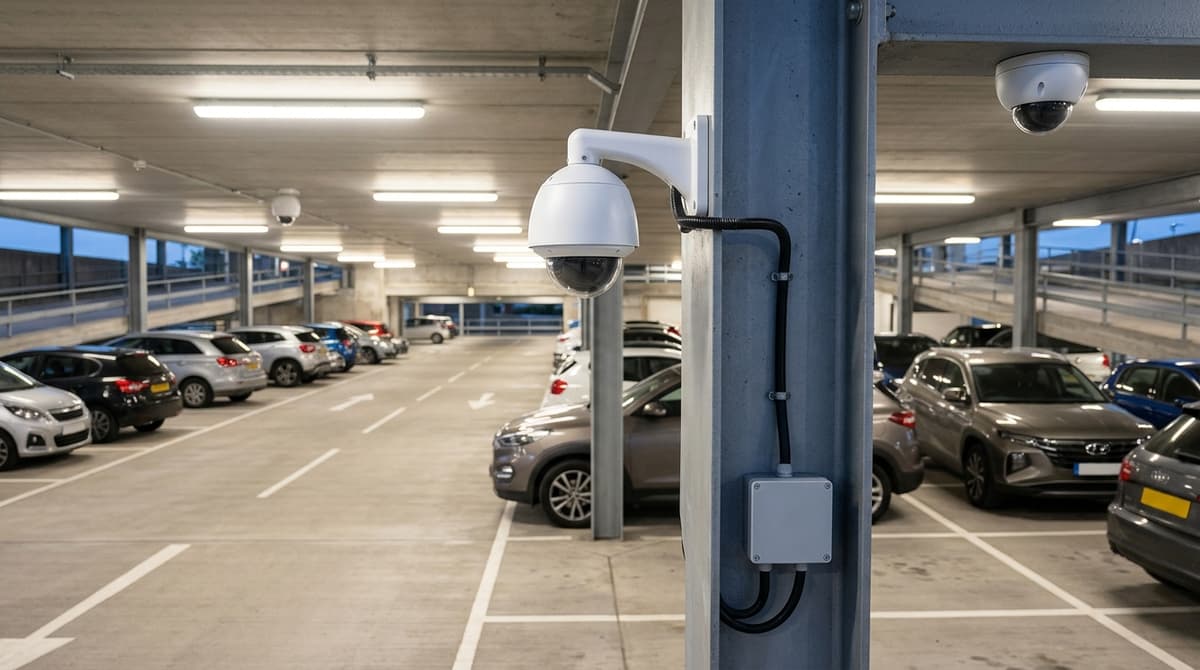
Use bullet cameras on the perimeter, a dedicated plate camera at lanes, PTZ or panoramic units over open areas, and domes in stairwells. No single camera type does overview, identification and plate capture well, so split the jobs.
Perimeter and open bays: bullet cameras. Camterra's retail and car park page positions bullet cameras for car park perimeters and access points. A fixed bullet gives a steady, repeatable view of a fence line or row of bays, and its visible body acts as a deterrent. Suits: owners who need fixed coverage of boundaries and parked vehicles, which is the usual brief behind a cctv camera for car park damage claims.
Entry and exit lanes: a dedicated plate-capture camera. A general-purpose camera set up to watch the lane will not reliably read plates. Our separate ANPR guide covers positioning and settings. Suits: sites that manage access, enforce time limits or need to trace vehicles.
Wide surface areas: PTZ or multi-sensor panoramic.
- PTZ: Verkada lists PTZ models with 360° pan, 220° tilt and up to 32x optical zoom. It also quotes licence plate recognition on its bullet cameras at up to 50m, and Intelli-Park says one View360 camera can watch up to 250 metres. These are vendor figures, not independent test results. A PTZ looks one way at a time, so it suits sites with someone reviewing live or alarm-driven footage.
- Multi-sensor panoramic: TechPro Security cites 180° to 360° coverage and fewer units. Suits: large open lots where continuous overview matters more than close-up detail.
Stairwells and lift lobbies: dome cameras at ground level. Domes are compact, and it is harder to tell which way the lens is pointing. Archangel AI raises the safety concern for lone people in car parks. Suits: multi-storey sites where people walk alone to their cars.
How do you calculate CCTV coverage and remove blind spots?
Work from a plan drawing and a required pixel density per zone, then place cameras to cover the pinch points first. Fill the open bays in afterwards.
-
Mark the pinch points on the plan: entrances, exits, pay machines, stairwells and lifts. Everyone passes through these, so they get the first cameras.
-
Set the purpose per zone: observe, recognise or identify. EN/IEC 62676-4 is the standard that ties these purposes to pixel density, so check its figures directly rather than relying on a rule of thumb.
-
Calculate the coverage:
- Scene width = 2 × D × tan(HFOV ÷ 2)
- Pixel density (px/m) = horizontal resolution ÷ scene width
Here D is the lens-to-subject distance and HFOV is the lens's horizontal field of view. For a high mount, use the slant distance, which depends on mounting height and the subject's height as well as ground distance. Compare the result with the density your zone needs.
-
Check the shadows behind pillars, ramps and parked vans, then add or re-aim cameras until each one is covered.
Multi-storey specifics
Low ceilings limit how far a camera can be set back, so you usually need a wider lens and more cameras. Mount them along the drive aisle looking down the lane, not across bays. Give each level's ramp its own camera, because a vehicle leaving one floor is easily lost between two.
Blind-spot checklist
- Walk the site at night with a monitor, checking live view for headlight glare and dark corners.
- Have someone walk each route, then review the recording to confirm it meets that zone's purpose.
How do you power, wire and tune a car park system so it stays reliable?
Hard-wired PoE is the dependable choice for permanent car parks, but cable distance and the power budget need working out first. One Ethernet cable per camera carries both data and power, so there are no batteries to flatten and no mains point needed at every pole.
Power budget
Check the switch's total PoE budget against everything it feeds:
switch PoE budget ≥ Σ (camera draw + IR/heater draw) across all ports + headroom
Take each draw from the camera datasheet. Cold-weather heaters and IR illuminators can add to a camera's draw, so count them if the model has them. Leave headroom rather than sizing to the exact total, because cameras draw more when the IR comes on at night.
Cable distance
Copper Ethernet is limited to a 100m run. Our Cat5e and Cat6 cable guides cover that limit and what to do beyond it. For cameras far from the cabinet, long-reach PoE switches and surge protection are the categories to look at. Your electrician or installer fits and terminates the cable.
Storage
Retention days = disk capacity ÷ (total bitrate × 86,400 seconds)
Use the same units throughout, so convert capacity to bits if the bitrate is in bits per second. Take each bitrate from the camera datasheet and add the cameras together. This assumes continuous recording, so motion-triggered recording should stretch the figure.
Motion tuning
- Draw detection zones over bays, aisles and entrances, and leave out trees, public pavement and the sky.
- Schedule by hours of darkness so alerts concentrate on the periods when the car park should be empty.
- Use line-crossing at the barrier to flag vehicles and people passing the line, which is more targeted than whole-frame motion.
Do car parks have CCTV, and can you get the footage?
Many car parks do, and in many cases you can ask the operator for footage of you, but there is no right to everything. Coverage depends on the individual site, so check for CCTV signage at the entrance and on the pay machines.
Do Euro Car Parks, pay-and-display or Lidl car parks have CCTV? It varies from site to site, whoever runs the car park. The sign should name the operator responsible for the cameras, and that is who you contact.
How to request footage
- Send a subject access request under UK GDPR to the operator named on the signage.
- Give the date, the time window, the location and a description of yourself and your vehicle.
- Expect other people's images to be blurred or redacted.
- The police can request footage from the operator separately, so report a crime and give them the details.
How long is footage kept? There is no fixed legal period. The operator has to be able to justify whatever retention period it sets, so it differs between sites. Footage can be overwritten before you ask, so send your request as soon as you can after an incident, including for damage to a parked car.
Frequently asked questions
Are you obliged to inform people that CCTV is in operation?
Yes. Under UK GDPR, people must be told when they are being recorded. Car park operators should display clear signs at entrances and around the site, stating that CCTV is in use, who operates it, why, and how to contact them. A fuller privacy notice can cover the detail.
How long do car parks keep CCTV?
UK GDPR sets no fixed period. Footage should be kept no longer than necessary for its stated purpose, such as investigating incidents, and the operator must decide and justify that period. Retention varies between sites, so ask the operator for its policy rather than assuming a standard figure.
Can you request CCTV footage from a car park?
Yes, if you appear in it. Make a subject access request to the operator, giving the date, time and location. Ask promptly, because footage may be overwritten. The operator may blur other people or refuse if releasing it would affect their rights. Police requests follow a separate route.
Which camera is best for car parking?
No single model suits every site. Judge a camera by the light on the car park floor, not its headline low-light claim, because datasheet figures depend on test conditions. Check the datasheet against your real lighting, then plan coverage, blind spots, weatherproofing and cable runs.
Do Euro Car Parks have CCTV?
We found no verified site-specific information, so we cannot confirm it for any particular location. Operators who use CCTV must display signage, so check the signs on site or ask the operator's data protection contact.
Sources & references
- CCTV Security for Retail & Car Parks | Camterra
- CCTV for council car parks | Professional Security Magazine
- CCTV In Operation | CCTV & Security | Car Park | YourParkingSign
- Best CCTV Cameras for Car Parks - William Hale Fire & Security
- AI CCTV for Car Parks | Archangel AI
- View360 Car Park Monitoring System | Car Park Cameras
- Parking Lot Security - Verkada
- eCam | Smart Car Park Enforcement & Monitoring
- cctv
- car
- parks
Written by
Clear Security Editorial Team
Buying guides researched against the equipment we stock, with every specification checked back to the manufacturer's datasheet and UK guidance reviewed before publication.
Related reading
- Home CCTV Systems UK 2026: Wired or Wireless?home cctv systems uk
- Best CCTV System 2026: How to Choose for UK Homes and Shopswhat cctv system is the best
- CCTV Christmas Shopping Season 2026: UK Readiness Guidecctv during christmas shopping season uk
- CCTV Lens Size for Face Recognition at 10 Metres (2026)what lens size cctv camera do i need to see a face at 10 metres
- 4MP vs 8MP CCTV Cameras: What the Difference Means in 2026what does 4mp vs 8mp mean for cctv cameras
- CCTV Checklist for Dark Evenings: UK Guide 2026cctv checklist dark evenings